
301 lines
8.8 KiB
Markdown
301 lines
8.8 KiB
Markdown
# yt-dlp Web UI
|
|
|
|
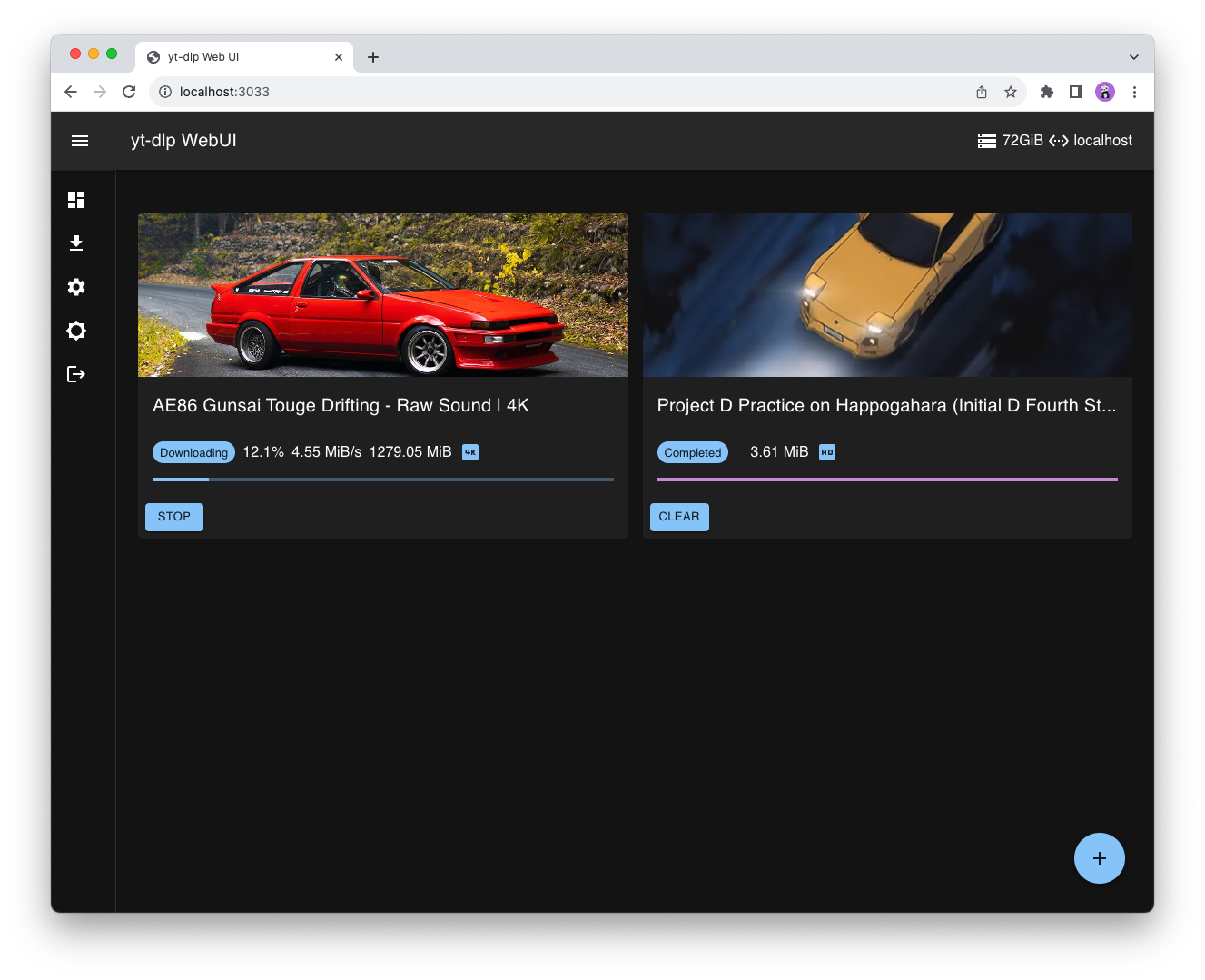
A not so terrible web ui for yt-dlp.
|
|
Created for the only purpose of *fetching* videos from my server/nas.
|
|
|
|
Intended to be used with docker and in standalone mode. 😎👍
|
|
|
|
Developed to be as lightweight as possible (because my server is basically an intel atom sbc).
|
|
|
|
The bottleneck remains yt-dlp startup time.
|
|
|
|
**Docker images are available on [Docker Hub](https://hub.docker.com/r/marcobaobao/yt-dlp-webui) or [ghcr.io](https://github.com/marcopeocchi/yt-dlp-web-ui/pkgs/container/yt-dlp-web-ui)**.
|
|
|
|
```sh
|
|
docker pull marcobaobao/yt-dlp-webui
|
|
```
|
|
```sh
|
|
# latest dev
|
|
docker pull ghcr.io/marcopeocchi/yt-dlp-web-ui:latest
|
|
```
|
|
|
|
[app.webm](https://github.com/marcopeocchi/yt-dlp-web-ui/assets/35533749/91545bc4-233d-4dde-8504-27422cb26964)
|
|
|
|
|
|

|
|
|
|
|
|
### Integrated File browser
|
|
Stream or download your content, easily.
|
|
|
|

|
|
|
|
## Changelog
|
|
```
|
|
05/03/22: Korean translation by kimpig
|
|
|
|
03/03/22: cut-down image size by switching to Alpine linux based container
|
|
|
|
01/03/22: Chinese translation by deluxghost
|
|
|
|
03/02/22: i18n enabled! I need help with the translations :/
|
|
|
|
27/01/22: Multidownload implemented!
|
|
|
|
26/01/22: Multiple downloads are being implemented. Maybe by next release they will be there.
|
|
Refactoring and JSDoc.
|
|
|
|
04/01/22: Background jobs now are retrieved!! It's still rudimentary but it leverages on yt-dlp resume feature.
|
|
|
|
05/05/22: Material UI update.
|
|
|
|
03/06/22: The most requested feature finally implemented: Format Selection!!
|
|
|
|
08/06/22: ARM builds.
|
|
|
|
28/06/22: Reworked resume download feature. Now it's pratically instantaneous. It no longer stops and restarts each process, references to each process are saved in memory.
|
|
|
|
12/01/23: Switched from TypeScript to Golang on the backend. It was a great effort but it was worth it.
|
|
```
|
|
|
|
## Settings
|
|
|
|
The currently avaible settings are:
|
|
- Server address
|
|
- Switch theme
|
|
- Extract audio
|
|
- Switch language
|
|
- Optional format selection
|
|
- Override the output filename
|
|
- Override the output path
|
|
- Pass custom yt-dlp arguments safely
|
|
- Download queue (limit concurrent downloads)
|
|
|
|

|
|

|
|
|
|
## Format selection
|
|
|
|
This feature is disabled by default as this intended to be used to retrieve the best quality automatically.
|
|
|
|
To enable it just go to the settings page and enable the **Enable video/audio formats selection** flag!
|
|
|
|
## Troubleshooting
|
|
- **It says that it isn't connected/ip in the header is not defined.**
|
|
- You must set the server ip address in the settings section (gear icon).
|
|
- **The download doesn't start.**
|
|
- As before server address is not specified or simply yt-dlp process takes a lot of time to fire up. (Forking yt-dlp isn't fast especially if you have a lower-end/low-power NAS/server/desktop where the server is running)
|
|
|
|
## [Docker](https://github.com/marcopeocchi/yt-dlp-web-ui/pkgs/container/yt-dlp-web-ui) installation
|
|
## Docker run
|
|
```sh
|
|
docker pull marcobaobao/yt-dlp-webui
|
|
docker run -d -p 3033:3033 -v <your dir>:/downloads marcobaobao/yt-dlp-webui
|
|
```
|
|
|
|
Or with docker but building the container manually.
|
|
|
|
```sh
|
|
docker build -t yt-dlp-webui .
|
|
docker run -d -p 3033:3033 -v <your dir>:/downloads yt-dlp-webui
|
|
|
|
docker run -d -p 3033:3033 \
|
|
-v <your dir>:/downloads \
|
|
-v <your dir>:/config \ # optional
|
|
yt-dlp-webui
|
|
|
|
```
|
|
|
|
If you opt to add RPC authentication...
|
|
```sh
|
|
docker run -d \
|
|
-p 3033:3033 \
|
|
-e JWT_SECRET randomsecret
|
|
-v /path/to/downloads:/downloads \
|
|
-v /path/for/config:/config \ # optional
|
|
marcobaobao/yt-dlp-webui \
|
|
--auth \
|
|
--user your_username \
|
|
--pass your_pass
|
|
```
|
|
|
|
If you wish for limiting the download queue size...
|
|
|
|
e.g. limiting max 2 concurrent download.
|
|
```sh
|
|
docker run -d \
|
|
-p 3033:3033 \
|
|
-e JWT_SECRET randomsecret
|
|
-v /path/to/downloads:/downloads \
|
|
marcobaobao/yt-dlp-webui \
|
|
--qs 2
|
|
```
|
|
|
|
### Docker Compose
|
|
```yaml
|
|
services:
|
|
yt-dlp-webui:
|
|
image: marcobaobao/yt-dlp-webui
|
|
ports:
|
|
- 3033:3033
|
|
volumes:
|
|
- <your dir>:/downloads # replace <your dir> with a directory on your host system
|
|
healthcheck:
|
|
test: curl -f http://localhost:3033 || exit 1
|
|
restart: unless-stopped
|
|
```
|
|
|
|
## [Prebuilt binaries](https://github.com/marcopeocchi/yt-dlp-web-ui/releases) installation
|
|
|
|
```sh
|
|
# download the latest release from the releases page
|
|
mv yt-dlp-webui_linux-[your_system_arch] /usr/local/bin/yt-dlp-webui
|
|
|
|
# /home/user/downloads as an example and yt-dlp in $PATH
|
|
yt-dlp-webui --out /home/user/downloads
|
|
|
|
# specifying yt-dlp path
|
|
yt-dlp-webui --out /home/user/downloads --driver /opt/soemdir/yt-dlp
|
|
|
|
# specifying using a config file
|
|
yt-dlp-webui --conf /home/user/.config/yt-dlp-webui.conf
|
|
```
|
|
|
|
### Arguments
|
|
```sh
|
|
Usage yt-dlp-webui:
|
|
-auth
|
|
Enable RPC authentication
|
|
-conf string
|
|
Config file path
|
|
-driver string
|
|
yt-dlp executable path (default "yt-dlp")
|
|
-out string
|
|
Where files will be saved (default ".")
|
|
-host string
|
|
Host where server will listen at (default "0.0.0.0")
|
|
-port int
|
|
Port where server will listen at (default 3033)
|
|
-qs int
|
|
Download queue size (default 8)
|
|
-user string
|
|
Username required for auth
|
|
-pass string
|
|
Password required for auth
|
|
```
|
|
|
|
### Config file
|
|
By running `yt-dlp-webui` in standalone mode you have the ability to also specify a config file.
|
|
The config file **will overwrite what have been passed as cli argument**.
|
|
|
|
```yaml
|
|
# Simple configuration file for yt-dlp webui
|
|
|
|
---
|
|
# Host where server will listen at (default: "0.0.0.0")
|
|
#host: 0.0.0.0
|
|
|
|
# Port where server will listen at (default: 3033)
|
|
port: 8989
|
|
|
|
# Directory where downloaded files will be stored (default: ".")
|
|
downloadPath: /home/ren/archive
|
|
|
|
# [optional] Enable RPC authentication (requires username and password)
|
|
require_auth: true
|
|
username: my_username
|
|
password: my_random_secret
|
|
|
|
# [optional] The download queue size (default: 8)
|
|
queue_size: 4
|
|
|
|
# [optional] Full path to the yt-dlp (default: "yt-dlp")
|
|
downloaderPath: /usr/local/bin/yt-dlp
|
|
|
|
# [optional] Directory where the log file will be stored (default: ".")
|
|
#log_path: .
|
|
|
|
# [optional] Directory where the session database file will be stored (default: ".")
|
|
#session_file_path: .
|
|
```
|
|
|
|
### Systemd integration
|
|
By defining a service file in `/etc/systemd/system/yt-dlp-webui.service` yt-dlp webui can be launched as in background.
|
|
|
|
```
|
|
[Unit]
|
|
Description=yt-dlp-webui service file
|
|
After=network.target
|
|
|
|
[Service]
|
|
User=some_user
|
|
ExecStart=/usr/local/bin/yt-dlp-webui --out /mnt/share/downloads --port 8100
|
|
|
|
[Install]
|
|
WantedBy=multi-user.target
|
|
```
|
|
|
|
```shell
|
|
systemctl enable yt-dlp-webui
|
|
systemctl start yt-dlp-webui
|
|
```
|
|
It could be that yt-dlp-webui works correctly when started manually from the console, but with systemd, it does not see the yt-dlp executable, or has issues writing to the database file. One way to fix these issues could be as follows:
|
|
```shell
|
|
cd
|
|
mkdir yt-dlp-webui-workingdir
|
|
# optionally move the already existing database file there:
|
|
mv local.db yt-dlp-webui-workingdir
|
|
nano yt-dlp-webui-workingdir/my.conf
|
|
```
|
|
The config file format is described above; make sure to include the `downloaderPath` setting (the path can possibly be found by running `which yt-dlp`). For example, one could have:
|
|
```
|
|
downloadPath: /stuff/media
|
|
downloaderPath: /home/your_user/.local/bin/yt-dlp
|
|
log_path: /home/your_user/yt-dlp-webui-workingdir
|
|
session_file_path: /home/your_user/yt-dlp-webui-workingdir
|
|
```
|
|
Adjust the Service section in the `/etc/systemd/system/yt-dlp-webui.service` file as follows:
|
|
```
|
|
[Service]
|
|
User=your_user
|
|
Group=your_user
|
|
WorkingDirectory=/home/your_user/yt-dlp-webui-workingdir
|
|
ExecStart=/usr/local/bin/yt-dlp-webui --conf /home/your_user/yt-dlp-webui-workingdir/my.conf
|
|
```
|
|
|
|
## Manual installation
|
|
```sh
|
|
# the dependencies are: python3, ffmpeg, nodejs, psmisc, go.
|
|
|
|
cd frontend
|
|
npm i
|
|
npm run build
|
|
|
|
go build -o yt-dlp-webui main.go
|
|
```
|
|
## Open-API
|
|
Navigate to `/openapi` to see the related swagger.
|
|
|
|
|
|
## Extendable
|
|
You dont'like the Material feel?
|
|
Want to build your own frontend? We got you covered 🤠
|
|
|
|
`yt-dlp-webui` now exposes a nice **JSON-RPC 1.0** interface through Websockets and HTTP-POST
|
|
It is **planned** to also expose a **gRPC** server.
|
|
|
|
Just as an overview, these are the available methods:
|
|
- Service.Exec
|
|
- Service.Progress
|
|
- Service.Formats
|
|
- Service.Pending
|
|
- Service.Running
|
|
- Service.Kill
|
|
- Service.KillAll
|
|
- Service.Clear
|
|
|
|
For more information open an issue on GitHub and I will provide more info ASAP.
|
|
|
|
## What yt-dlp-webui is not
|
|
`yt-dlp-webui` isn't your ordinary website where to download stuff from the internet, so don't try asking for links of where this is hosted. It's a self hosted platform for a Linux NAS.
|